Documentation Index
Fetch the complete documentation index at: https://user-guide.fabric.so/llms.txt
Use this file to discover all available pages before exploring further.
.avif?fit=max&auto=format&n=7jRp3Qwzy0kFFSpt&q=85&s=a23e11218fd608b0abe9155d1d639498)
About Fabric notes
- Fabric comes with a world-class text editor and document authoring tool.
- Designed for minimalism, speed, but with all the features you could want.
- Write in the same place that your research, ideas and files are.
Editor features:
- Real-time multiplayer editing
- Link to any content in Fabric
- Embed images, files and other notes into a document
- Toggle lists
- Outlining tools
- Tables
- Code blocks, with syntax highlighting for over 40 languages
- Highlighting, commenting, @mentions
- AI document editing
- Publishing
- Text search
How do I use it?
- Highlight any text to see the formatting toolbar (highlight, format text, change to a different block type e.g. code block, image, title etc.).
- Press
/or click the+symbol to see the menu to add a new block. - Grab the block to drag the current block or down.
- Click the block to see options to transform the current block into a different type.
Link between your notes
- Tap
[[to see options to reference other files or folders from your Fabric workspace. - Referencing a file or folder creates a link to that entity.
Publish your work
- Just click
Shareand turn onPublishingto make your content available to a wider audience. - You can optionally choose to turn on
Search engine indexing, and your content will be discoverable and indexed by Google and other search engines.
Comment, mention and leave feedback
- Highlight any text and click the yellow highlight icon to create an annotation referencing that text highlight. You can optionally choose to add some text, creating a comment.
- Clicking the location icon on the annotation (in the comment panel) will auto-scroll the text editor to that location.
- You can also @mention a teammate or collaborator, and they’ll receive a notification.
AI writing assistant
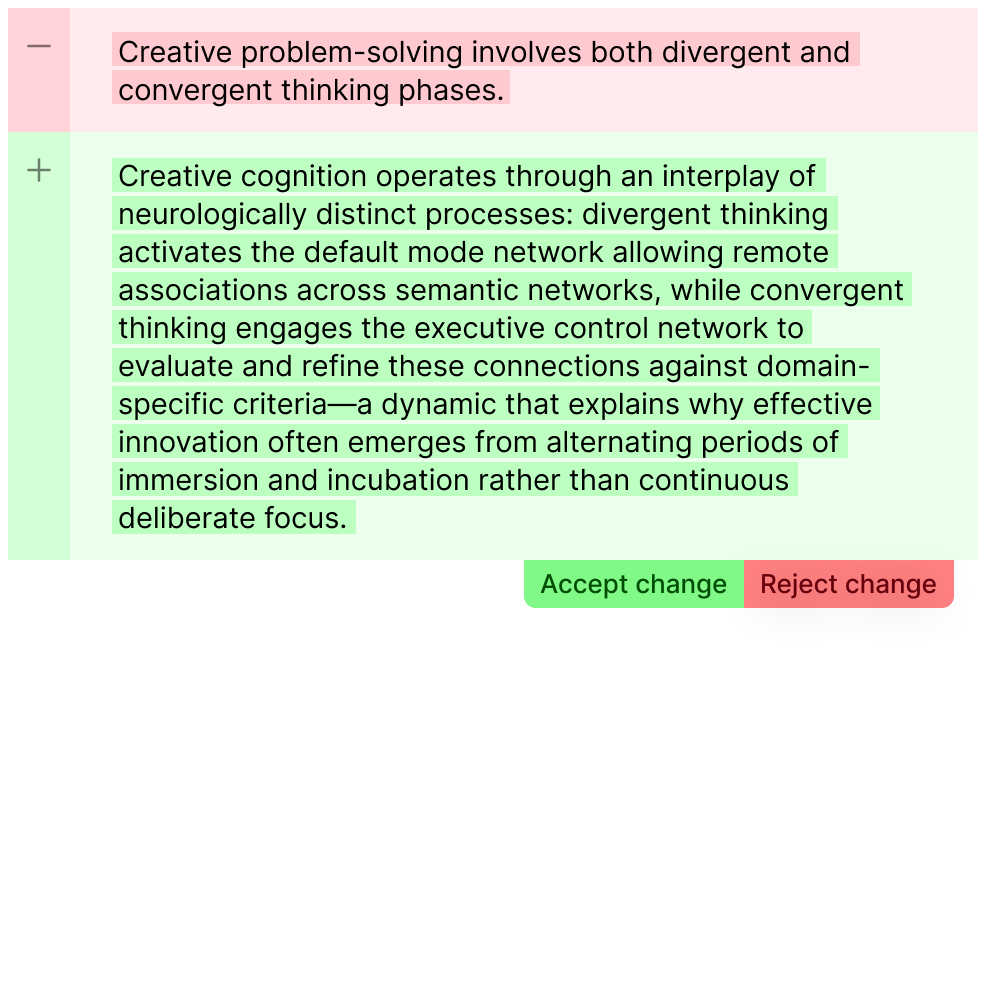
- With a document open, you can ask your Fabric AI Assistant to modify the document for you, in any way that you can imagine. A writing companion.
- Fabric Assistant will propose a set of changes, which will be visible on the document as a set of changes (diffs). These will show what will be removed (red), and what will be added (green).
- You can choose to
AcceptorRejecteach change manually, or apply/reject all the changes in one go.